

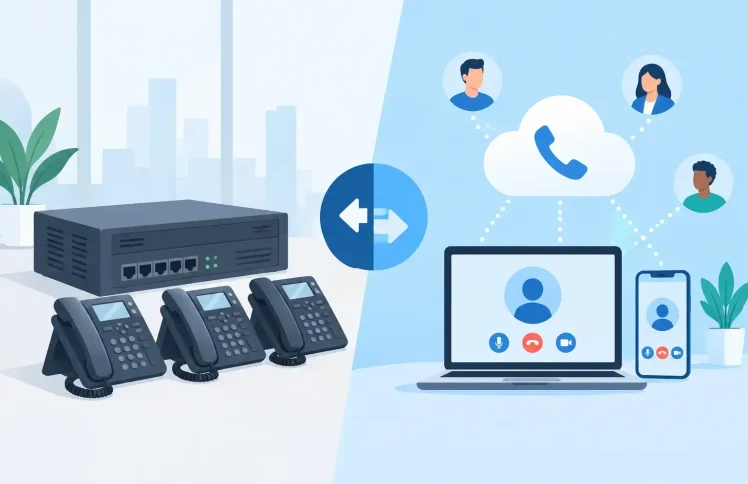
A phone system decision can become expensive long before the first call is answered. A hardware PBX versus software comparison is not simply about choosing a box in a server room or an app in the cloud. It affects how quickly you can add users, route customer calls, support remote staff, connect Microsoft Teams, and control your monthly costs.
For many small and midsize businesses, traditional PBX hardware was once the default because it was the only practical way to run business telephony. That has changed. Software-based PBX platforms can now provide the same core call handling functions – and often more flexibility – without tying every change to specialized equipment or an on-site visit.
The better choice depends on your operating model, technical resources, security requirements, and tolerance for upfront investment. Here is how to assess the trade-offs in practical terms.
Hardware PBX Versus Software: The Real Difference
A hardware PBX is a physical appliance installed at your office, data center, or branch location. It manages extensions, inbound and outbound calling, call routing, voicemail, and other phone functions. It may connect to traditional phone lines, SIP trunks, desk phones, and gateways. Your organization owns or leases the equipment and is responsible for keeping it running.
A software PBX provides those functions as software running on a server, virtual machine, or cloud environment. It can be self-hosted when you want control over the infrastructure, or hosted by a provider when you prefer not to maintain the underlying systems. Users can connect through desk phones, softphones, mobile apps, or Microsoft Teams, depending on the platform.
The distinction matters because the PBX becomes easier to change when it is software. Adding an extension, creating a queue, adjusting an IVR greeting, or setting holiday routing can be handled in a web interface rather than through appliance configuration, licensing requests, or technician time.
Start With the Cost Model, Not the Purchase Price
Hardware PBX systems often look predictable because the major purchase happens upfront. But the appliance is only one part of the cost. Businesses should also account for installation, maintenance contracts, replacement hardware, backup power, capacity upgrades, licensing, gateway equipment, and the time required to administer the system.
That model can make sense for organizations with a stable office footprint, an experienced telecom team, and strict requirements to keep all systems on-site. If the hardware is already paid for and meets current needs, replacing it immediately may not be a priority.
Software PBX costs tend to be more flexible. A self-hosted option can reduce recurring infrastructure costs while allowing the business to manage its own environment. A cloud deployment shifts server maintenance, updates, and capacity planning away from the internal team. Instead of paying for a system sized for a future headcount, companies can usually add users, call-flow features, or capacity as they need them.
The key question is not, “Which option is cheaper?” It is, “Which costs stay predictable as our business changes?” A low-cost appliance can become costly when opening a new location, supporting hybrid staff, or adding advanced call handling that requires new licenses and configuration work.
Flexibility Is Where Software Usually Wins
Phone systems must reflect how a business actually works. A customer calling sales should reach the right team. A caller outside business hours should hear accurate information or be sent to an emergency contact. A service department with high call volumes may need queues, callback rules, agent availability, and supervisor visibility.
A modern software PBX is built for these adjustments. Administrators can create ring groups, route calls by time of day, build IVR menus, forward calls to mobile devices, and manage conference access from a central interface. Calendar-based rules can account for holidays, seasonal hours, or departmental schedules without leaving outdated messages active for weeks.
Hardware systems can also support many of these functions, especially enterprise-grade models. The difference is often the effort required to make changes. On older installations, even a simple update may depend on a trained administrator, proprietary management tools, or a service provider. That creates delay when the business needs to react quickly.
For distributed teams, software also removes the assumption that an employee must sit next to a PBX-connected desk phone. A new employee can receive an extension and use approved devices from the office, home, or while traveling. QR-code provisioning and centralized device management reduce the manual work of preparing those endpoints.
Reliability Depends on Design, Not the Form Factor
A common concern is that hardware is more reliable because it remains in the building. That can be true in a narrow scenario: an on-site PBX may keep operating locally during an internet outage if it has compatible phone connectivity, power, and properly configured fallback options.
But local hardware has its own risks. A power failure, failed disk, damaged network switch, overheating equipment room, or site-level incident can take the phone system offline. Reliability depends on redundancy, monitoring, backup power, network design, and a tested recovery plan. Those protections cost money and require ongoing attention.
Cloud software PBX services move much of that infrastructure responsibility to the hosting environment. This can improve availability for businesses without redundant office infrastructure, but it also makes internet connectivity essential. The practical answer is to plan for failure on either model: use reliable connections, provide a secondary connection where needed, configure mobile or external call forwarding, and define what happens when a site loses power.
A software PBX can be particularly useful for continuity because calls can be redirected without requiring employees to return to the office. If one location is unavailable, callers can still reach another team, a mobile device, or a remote queue.
Microsoft Teams Changes the Evaluation
Organizations using Teams often discover that chat and meetings are only part of their communications requirements. They still need public phone numbers, department menus, business-hours routing, call queues, shared reception coverage, reporting, and call supervision.
Trying to add these capabilities through separate tools can create a fragmented experience. Users switch between applications, administrators manage several licensing models, and customers may encounter inconsistent routing.
A software PBX that integrates Teams with enterprise telephony functions provides a cleaner path. Teams users can keep their familiar calling experience while the PBX manages the business logic behind it. This is especially useful for a front desk, sales team, customer service operation, or multi-location business that needs calls to follow defined rules rather than simply ring individual users.
Before choosing a platform, confirm how Teams connectivity works, which features are included, how users are provisioned, and whether changes can be managed centrally. Avoid assuming that basic Teams calling automatically covers IVR, advanced queues, supervision, or the phone administration needs of a growing business.
When Hardware Still Makes Sense
Software is not automatically the right answer for every organization. A hardware PBX may remain a reasonable fit when a business has very limited internet reliability, highly specialized analog equipment, regulatory constraints that require a specific on-site design, or an internal telecom team already equipped to support the environment.
Some facilities also need local integrations that are expensive to replace, such as legacy paging systems, door entry controls, fax workflows, alarm lines, or industrial devices. In these cases, the best path may be a phased transition rather than a full replacement. Software can still support the broader communications strategy while gateways or adapters keep selected legacy endpoints operating.
The goal is not to preserve hardware for its own sake. It is to identify which requirements are genuinely local and which are simply habits created by an older phone system.
A Practical Decision Framework
Ask how often your call flows change, how many locations and remote employees you support, and whether your current system makes simple administration difficult. Then look at the next two to three years: new offices, seasonal staffing, contact center needs, Teams adoption, or a move away from a central office can quickly change the answer.
Also separate control from maintenance. Self-hosted software gives your IT team direct control of the PBX environment without requiring proprietary appliance hardware. Cloud deployment reduces the operational work of maintaining servers and updates. Both options can be more adaptable than a fixed appliance, but they serve different internal capabilities.
Ayrix reflects this choice by offering a software-based PBX that can be deployed on premises or in the cloud, with telephony features managed through one interface. Small teams can start without buying a PBX appliance, while larger organizations can add the extensions, call-flow modules, and capacity they actually require.
The right phone system should make ordinary changes ordinary. If updating business hours, adding a user, rerouting a department, or supporting a remote employee feels like a project, the infrastructure is working against the business. Choose the approach that gives your team the right level of control without making every call-flow change a technical event.
 English
 Deutsch (Schweiz)