
A Teams telephony integration guide should start with the calls your business cannot afford to miss. A sales inquiry at 8:05 a.m., a customer needing urgent support, or a caller reaching your main number after hours all require more than a chat and meeting platform. They require clear call handling, reliable routing, and an administrator who can make changes without rebuilding the phone system.
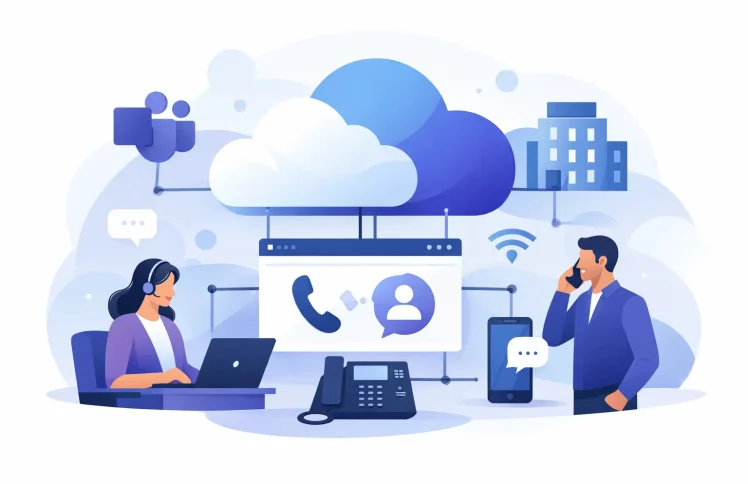
Microsoft Teams is already where many employees communicate internally. Integrating it with business telephony extends that familiar workspace to external calling while adding the PBX functions that keep customer communications organized. The goal is not simply to place and receive calls in Teams. It is to give the business one manageable environment for users, numbers, call flows, queues, desk phones, and mobile availability.
What Teams telephony integration should deliver
A successful integration connects Teams to the public telephone network and pairs it with the controls of a business phone system. Employees can use Teams for calls, while the organization retains practical control over how incoming and outgoing calls are handled.
For a small office, that may mean a main number that rings several people and forwards to a mobile phone outside business hours. For a growing support team, it may mean an IVR that lets callers choose Sales, Billing, or Technical Support before entering the appropriate queue. For a distributed business, it may mean staff can answer on Teams, a desk phone, or a mobile device without customers needing separate numbers for each location.
The strongest setup keeps these functions connected. A caller should not have to understand your internal structure to reach the right team, and your team should not have to switch between separate systems to see who is calling, transfer a conversation, or update a greeting.
Choose the right connection model
Teams calling can be enabled through several approaches. The right choice depends on your existing carrier relationships, geographic requirements, calling volume, compliance needs, and how much PBX functionality you need around Teams.
Microsoft calling plans can be a straightforward choice for organizations that want Microsoft to provide calling service in supported locations. They can work well for simple requirements, but costs and available features should be reviewed carefully as user counts and international calling needs increase.
Operator Connect provides a carrier-managed route into Teams. It can reduce some deployment effort when your preferred provider participates, although the available carriers, numbers, and service options vary by country and region.
Direct Routing is often the flexible option for businesses that want to connect Teams to their chosen SIP carrier or PBX platform. It can support existing numbers, local providers, more tailored routing, and business telephony functions outside the standard Teams calling experience. It also introduces design decisions: someone must manage the connection, security, number porting, emergency calling, and ongoing changes.
For many small and midsize businesses, the practical question is not which model sounds most advanced. It is whether the model gives you the call control you need at a cost you can predict. If you need queues, detailed time rules, department routing, and device flexibility, a PBX-based integration is usually worth considering early rather than adding workarounds later.
Map call handling before configuring anything
The most common integration mistake is starting with licenses and user accounts instead of the customer journey. Before you connect a number, document what should happen when someone calls each business line.
Start with your main number. Decide whether callers hear a greeting, reach a receptionist, choose a department, or enter a queue. Then define what happens if nobody answers. A simple ring group may be enough for a five-person company. A busy service desk may need queue announcements, overflow rules, callback options, and supervisor visibility.
Opening hours also need real attention. Create separate behavior for open, closed, holiday, and emergency conditions. A time condition can play an appropriate message and send urgent calls to an on-call employee. Calendar-based availability is especially useful when departments have different schedules or when a temporary closure affects only one location.
Keep the first version simple. A caller should reach a person or receive a useful answer within a few choices. An IVR with too many menu levels may look organized on paper, but it creates frustration for callers and more maintenance for administrators.
A practical call-flow example
Consider a 30-person business with sales and support teams. Its main number can begin with a short greeting: press 1 for Sales, 2 for Support, and 3 for Accounts. Sales calls ring a group of account representatives. Support calls enter a queue with estimated wait messaging and overflow to a supervisor after a set time. Accounts calls ring during business hours and go to voicemail or a designated mailbox after hours.
Each destination can include backup coverage. If a sales representative is in a Teams meeting or marked unavailable, the call can move to the next available person, a ring group, or a mobile destination according to policy. The business stays reachable without requiring every employee to publish a personal mobile number.
Build the Teams telephony integration in logical stages
A staged rollout reduces disruption and makes troubleshooting much easier. Begin by confirming your Teams tenant settings, user identities, number requirements, and the calling method you will use. Review licensing and permissions before assigning numbers, because a correct PBX configuration cannot compensate for missing Teams calling eligibility.
Next, connect the telephony platform to Teams and configure the connection required by your selected model. Secure signaling, user authorization, and correct number formatting matter here. Test inbound and outbound calls with a small group before moving an entire department.
Then create users, extensions, and devices. A good configuration gives every user a clear primary endpoint while allowing appropriate alternatives. An employee may answer primarily in Teams but also use a desk phone in a shared office or a mobile app while traveling. QR-code provisioning can make supported device setup far less time-consuming than manually entering server and account details on every handset.
After users are working, build the call flows you mapped earlier. Configure IVRs, queues, ring groups, forwarding rules, time conditions, and voicemail handling. Assign a test number first if possible. That lets you validate greetings, transfers, queue behavior, and after-hours routing without affecting the public main line.
Finally, move numbers in a controlled porting plan. Keep an inventory of every number, its current carrier, its assigned destination, and the owner responsible for confirming service after the move. Number porting dates need communication across IT, operations, reception, and customer-facing teams. A technically successful port can still create problems if staff do not know where calls will arrive on day one.
Do not treat Teams as the entire phone system
Teams is an excellent employee workspace, but many customer-facing telephony needs belong in a dedicated PBX layer. This is where organizations can control detailed routing, create reusable call-flow modules, manage shared numbers, and monitor service performance.
Queues illustrate the difference. A Teams user can handle a call, but a service operation often needs more: queue rules, agent availability, overflow destinations, time-based behavior, reporting, and call supervision. Managers may need to listen in, coach an agent, or take over a call when an escalation occurs. These are operational tools, not just calling features.
The same applies to reception and front-door routing. A central web interface makes it easier to change an announcement, redirect a department during an outage, or add temporary coverage for a seasonal peak. The alternative is often a mix of individual Teams settings, carrier portal settings, and undocumented exceptions that only one administrator understands.
Ayrix is designed around this model: Teams calling combined with centrally managed PBX functions, with the option to deploy in the cloud or retain on-premises control. That flexibility matters when data policies, internal IT practices, or regional carrier requirements make a one-size-fits-all service impractical.
Control costs without cutting call quality
Telephony costs are not limited to a monthly price per user. Review calling licenses, carrier rates, number porting, international usage, devices, implementation time, and the cost of add-on features. A low entry price can become expensive if every queue, call flow, or integration requires a separate extension.
Modular pricing is useful when it matches actual usage. A small team may only need core calling and a ring group. A larger operation may add queues, call supervision, advanced routing, and more capacity as demand grows. Paying for the functions you use is generally more sensible than purchasing an enterprise bundle before the business needs it.
At the same time, do not under-design critical coverage. Saving money by skipping overflow routing or after-hours handling can cost far more in missed opportunities and dissatisfied customers. The right balance is a simple baseline system with clear expansion paths.
Test the exceptions, not just a normal call
Before launch, test more than a call from one employee to another. Call the main number during open and closed hours. Choose every IVR option. Let a queue time out. Test transfers to Teams, desk phones, and mobile devices. Confirm that voicemail and missed-call notifications reach the right people.
Also test failure scenarios. What happens if the internet connection at one site fails, a queue has no available agents, or a key employee is on vacation? Confirm emergency calling requirements for every location and verify that caller ID displays the intended business number on outbound calls. These checks are where hidden configuration gaps usually appear.
Once the system is live, review call patterns regularly. High abandonment in a queue may indicate understaffing, a confusing IVR, or a routing rule that sends too many callers to one team. Use the data to improve the customer experience rather than treating the phone system as a set-and-forget project.
The best Teams telephony integration is one your team can adjust with confidence. When hours change, staff move between departments, or customers start calling more often, your phone system should help the business respond quickly instead of becoming the next problem to solve.
 English
  Deutsch (Schweiz)