

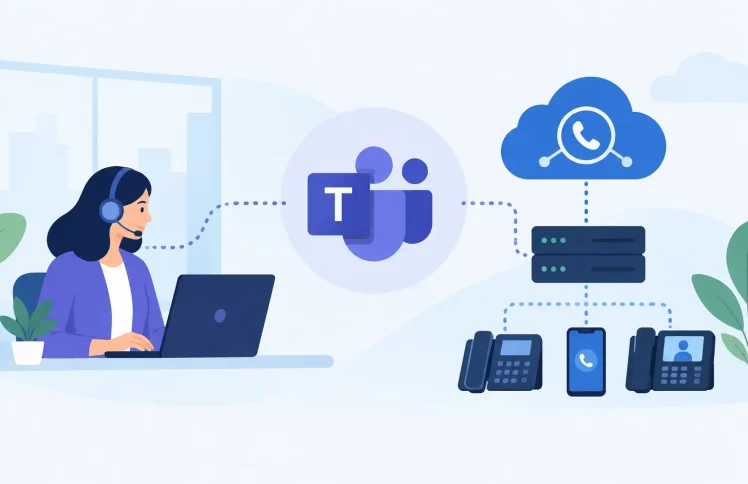
A customer calls your main business number. Instead of reaching a separate desk-phone system, the call can enter Microsoft Teams, follow your opening-hours rules, play an IVR menu, and land in the right queue. What is Direct Routing? It is the connection that makes this kind of business calling possible by linking Microsoft Teams to the public phone network and your chosen telephone service.
For small and midsize organizations, Direct Routing is less about adding another communications platform and more about keeping control of the calling environment they already need. It lets Teams become part of a complete phone system without forcing every business to accept a one-size-fits-all calling plan, carrier relationship, or call-flow design.
What is Direct Routing?
Direct Routing is a Microsoft Teams capability that connects Teams to external telephone numbers through a certified Session Border Controller, or SBC. The SBC sits between Teams and your telecom provider, PBX, or SIP trunk. It securely manages the signaling and media paths needed for incoming and outgoing business calls.
In practical terms, Direct Routing allows a Teams user to make and receive calls using a regular business number. An employee can answer from the Teams desktop app, mobile app, or a compatible desk phone, while the business retains its existing numbers and can choose its preferred carrier.
Teams provides the user experience. Direct Routing provides the path to the PSTN, the public switched telephone network used for calls to mobile numbers, landlines, and other external phone services. A PBX platform can add the operational logic around that path: auto attendants, queue distribution, extension dialing, time conditions, call forwarding, reporting, and supervision.
Why businesses choose Direct Routing
Many organizations start with Teams for chat, meetings, and internal collaboration, then find that customer and supplier calls still live elsewhere. That creates extra systems to manage and an inconsistent experience for employees. Direct Routing brings external telephony into the same Teams environment people already use.
The main advantage is flexibility. A business can often keep its current phone numbers and work with a carrier that offers the coverage, rates, and service terms it needs. This matters for companies with international locations, specialized local-number requirements, or existing SIP contracts that they do not want to replace.
It also gives administrators more choice in how calls are handled. A simple deployment may route a direct number to one employee. A more advanced design can route callers by department, language, office location, business hours, or overflow rules. When support volume rises, calls can enter a queue, be distributed to available agents, and be monitored by a supervisor.
Cost can be another reason to use Direct Routing. Microsoft calling options may be suitable for some teams, but they are not always the most economical or flexible answer for every calling pattern. Direct Routing lets businesses compare carrier rates, avoid paying for capacity they do not need, and use a PBX layer that matches their required features rather than a broad bundle.
How Direct Routing works in a real call
A typical inbound call follows a straightforward route. A customer dials your business number. Your carrier sends that call to the SBC. The SBC establishes the secure connection to Microsoft Teams or to the PBX call flow that serves Teams users. The call is then sent to a person, ring group, auto attendant, or queue based on the rules you have configured.
Outbound calling follows the same components in reverse. A Teams user dials an external number. Teams passes the call through the SBC, which sends it to the carrier for delivery to the public phone network. The recipient sees the approved business caller ID rather than an employee’s personal number.
The important detail is that Direct Routing does not replace call management by itself. It creates the calling connection. The experience callers receive depends on the PBX and routing logic around it. If your business needs a menu for sales and support, a message outside business hours, or an escalation rule when a queue is full, those functions must be designed and administered in the telephony platform.
The role of the SBC
The Session Border Controller is not just a technical connector. It is a security and interoperability boundary between Microsoft Teams and external telecom services. It helps authenticate traffic, apply routing policies, and protect the voice environment from unwanted or malformed connections.
For many businesses, the question is not whether an SBC is necessary. It is whether to operate one themselves or use a hosted service where the provider manages it. Self-managing can make sense when an IT team needs direct control, has existing telecom expertise, and wants to integrate a local SIP environment. A managed approach reduces infrastructure work and can be easier to scale across sites.
Direct Routing vs. Microsoft calling plans
Direct Routing and Microsoft calling plans both enable Teams users to place external calls, but they use different operating models. With a calling plan, Microsoft supplies the PSTN calling service in supported markets. With Direct Routing, the business connects Teams to a carrier or telephony provider of its choice through an SBC.
A calling plan can be a convenient fit for a small, straightforward setup in a supported region. Direct Routing is often a better fit when you need to retain an existing carrier, use numbers across multiple countries, integrate a PBX, or apply detailed routing rules. It may also be preferable where call volumes, international rates, or regulatory requirements call for more carrier flexibility.
There is no universal winner. The right choice depends on locations, number availability, compliance needs, expected call traffic, and how much control the business needs over its call flows. Some organizations also use a mixed design, selecting the approach that fits each location.
What Direct Routing can support
Once Teams is connected to business telephony, it can support much more than individual inbound and outbound calls. The value comes from building the operational behavior your organization needs around those calls.
A service business might use an IVR to direct callers to appointments, billing, or technical support. A sales team might ring several available representatives at once, then send unanswered calls to a shared queue. A distributed company can give employees local business numbers while allowing them to answer from Teams anywhere they have an approved connection.
For customer-facing teams, availability rules are especially useful. Calls can follow office schedules, holiday calendars, and temporary closures automatically. Rather than relying on someone to change a greeting at the end of every day, the PBX can apply the correct route and message based on the time and date.
Platforms such as Ayrix can place this call-flow management alongside Teams integration, so administrators can manage queues, IVRs, ring groups, calendars, and user provisioning from one web interface. The goal is not to make telephony more complicated. It is to make common business rules visible and manageable without a long configuration project.
What to plan before deployment
Direct Routing works best when the technical connection and the business calling design are planned together. Start with your numbers. Decide which existing numbers will be ported, which numbers must remain with another provider, and which locations need new local or toll-free numbers. Porting can take time, so it should be scheduled before any hard cutover date.
Next, map what happens to an incoming call. Identify the main number, departments, backup recipients, after-hours behavior, voicemail rules, and emergency calling requirements. This exercise often reveals gaps in the current phone setup, such as calls that depend on one person’s mobile phone or a queue with no overflow route.
Then consider users and devices. Some employees may work entirely in Teams, while reception staff or warehouse teams may need desk phones. Others may need mobile access with business caller ID. A good deployment supports these roles without giving every employee the same license, device, or feature set.
Security and reliability deserve equal attention. Use a certified SBC approach, restrict administrative access, document routing changes, and test critical scenarios before launch. Test external inbound and outbound calls, transfer behavior, voicemail, caller ID, emergency dialing, queue overflow, and after-hours routing. If customer calls are business-critical, define a failover route for an internet outage or service interruption.
Finally, review licensing and total cost as a complete system. Direct Routing may involve Teams telephony licensing, carrier charges, SBC hosting or operations, PBX functions, and device costs. Transparent, modular pricing is useful because it lets a company pay for the users, capacity, and call-flow features it actually needs.
Is Direct Routing right for your business?
Direct Routing is a strong option when Teams is already central to employee collaboration but the business needs more control over external calling. It is particularly useful for organizations that require flexible carrier choice, advanced call routing, international number coverage, or an affordable way to combine Teams with PBX functions.
It may be more than a very small team needs if all calls are basic and a simple provider-managed plan covers every location. But once calls need to follow real business rules, such as sending customers to the right department, responding correctly outside opening hours, or supporting agents across multiple sites, the additional control becomes practical rather than optional.
Treat Direct Routing as the foundation for a phone environment that can adapt as your business changes. Start with clear call paths, choose the level of infrastructure control your team can support, and make sure the system can grow without turning routine phone administration into a specialist task.
 English
 Deutsch (Schweiz)