
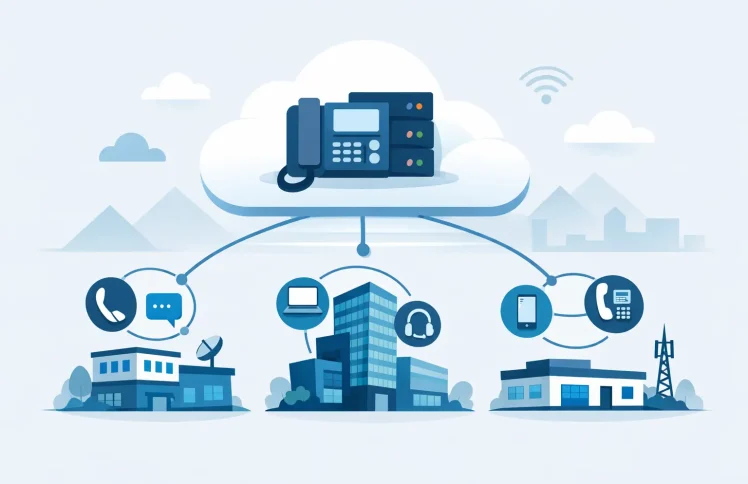
A new office opens, a remote team grows, or two companies merge. Suddenly, the phone system has to do more than make and receive calls. Each location needs its own number, hours, departments, and devices, while IT needs one place to manage the whole environment. That is the real challenge of a multi site PBX deployment: keeping local service personal without creating a separate phone system for every office.
A software-based PBX changes the equation. Instead of buying, maintaining, and configuring hardware at every site, organizations can run a centrally managed phone environment that supports desk phones, mobile users, and Microsoft Teams. The goal is not to make every location identical. It is to give every location the call handling it needs while keeping administration, reporting, and costs under control.
What a Multi Site PBX Deployment Should Solve
A multi-site system should make it easy to answer a simple question: when a customer calls this number, what should happen next? The answer may vary by office, time of day, holiday calendar, department, or agent availability.
For example, a customer calling a Chicago branch may need a local greeting and a sales queue during business hours. After hours, the call may go to an on-call group that includes employees in other states. A caller reaching a general company number may first choose a department, then be routed to the nearest available team member regardless of location.
This is why a multi-site design is more than assigning extensions to offices. It needs a clear structure for direct numbers, IVR menus, call queues, ring groups, forwarding rules, voicemail, and business hours. Central management keeps that structure consistent, but the configuration must still reflect how each team actually works.
Start With Call Flows, Not Hardware
Legacy projects often begin with a hardware count: how many PBX appliances, desk phones, gateways, and backup components are needed at each location? A modern deployment should begin with the customer journey and the employee workflow.
Map the main inbound numbers first. Identify whether each number represents a location, department, campaign, or shared service. Then define the path for calls during open hours, closed hours, holidays, and unexpected disruptions. This exercise usually reveals routing rules that have been handled informally for years, such as a receptionist transferring calls to a remote specialist or a manager taking urgent calls on a mobile device.
Next, decide which functions belong at the company level and which should remain local. A company-wide support queue may be shared across all offices. A local front desk number should usually preserve its own greeting, schedule, and fallback destination. Finance may need a single queue, while service technicians may need regional ring groups.
The best rule is simple: centralize administration and shared resources, but localize customer-facing experiences where they matter. Trying to force every office into one rigid call flow can frustrate both callers and staff.
Build a Number and Extension Plan That Can Grow
A clean numbering plan prevents avoidable work later. Each user should have a predictable extension, and each office, department, queue, and conference room should follow a naming convention that administrators can understand at a glance.
For a small organization, extensions may be grouped by location. For example, one office can use the 200 range and another the 300 range. For a growing business, it can be more useful to reserve blocks for future teams, shared services, and temporary projects. The specific pattern matters less than consistency.
Keep direct inward dialing numbers separate from extensions in your planning. A user may have a direct public number, an internal extension, and a presence-enabled Teams identity. Those elements should work together, but they serve different purposes. Clear documentation helps administrators troubleshoot routing and helps employees understand how calls reach them.
It also pays to plan for acquisitions, temporary sites, and remote hires. A flexible software PBX can add users and call flows without installing another appliance, but only if the internal structure is organized from the start.
Choose the Right Deployment Model for Each Site
There is no single correct architecture for every organization. Some businesses need on-premises control because of internal security policies, existing network design, or local operational requirements. Others prefer a cloud deployment because they want automatic updates, less infrastructure, and simpler expansion.
A hybrid approach can also make sense. A central PBX instance may manage call flows and users while sites connect through secure internet access and use locally provisioned devices. Remote employees can work from home with a softphone, Teams, or a mobile device without being treated as a separate branch office.
The practical question is not whether cloud or self-hosted is universally better. It is whether the selected model gives the business reliable calling, an acceptable level of control, and a supportable operating cost. For a five-person office, an on-premises server may add unnecessary effort. For a business with strict internal hosting requirements, self-hosting may be the better fit.
Design for Internet Failure and Local Continuity
Centralization should not mean ignoring local resilience. If an office loses internet access, determine what happens to inbound and outbound calls. The right answer depends on the site’s role, the likely impact of downtime, and available connectivity options.
For some locations, automatic forwarding to mobile numbers or another office is enough. For a customer service center, a secondary internet connection and predefined failover routing may be justified. Critical teams may also need clear procedures for communicating their temporary contact method to customers and colleagues.
Test these scenarios before launch. Place calls after changing time conditions, simulate an unavailable queue, and confirm that emergency and priority calls follow the expected path. A call flow that looks correct in a web interface is only proven when it works under real conditions.
Keep Device Provisioning Centralized
Managing phones site by site creates needless overhead. An administrator should be able to add a user, assign an extension, apply a device profile, and provision a desk phone without traveling to the office or manually entering long configuration strings.
QR-code provisioning and centralized device management are especially useful when opening a new location or replacing equipment. A device can be prepared for the right user and connected with minimal local effort. This reduces configuration errors and makes it easier to standardize settings across locations.
Do not assume every employee needs the same endpoint. Reception teams may need desk phones with expansion modules. Sales staff may prefer Teams or a mobile client. Warehouse employees may need simple shared-area devices. A multi-site PBX should support these different working styles while applying the same routing and availability rules behind the scenes.
Make Microsoft Teams Part of the Call Strategy
Many businesses already use Microsoft Teams for internal collaboration, but Teams alone does not always provide the detailed telephony control needed for customer calls. Multi-level IVRs, complex queues, calendar-based routing, call supervision, and location-specific business hours need to be planned as part of the PBX environment.
A PBX with Teams integration lets employees use a familiar collaboration tool while the business retains structured telephony functions. A Teams user can receive a customer call routed through an IVR, participate in a queue, transfer the call to a desk phone user, or follow a time-based availability rule.
This approach can also reduce duplicate administration. Instead of building one set of user rules for collaboration and another for telephony, administrators can manage a coordinated environment through a single interface. The key is to define responsibility clearly: who manages Teams identities, who owns call flows, and who approves changes to business-critical routing.
Control Costs Through Modular Growth
Multi-site projects can become expensive when every location is treated as a full standalone installation. Hardware purchases, maintenance contracts, per-site licensing, and specialized configuration work can consume budget before the system delivers value.
A software-based platform gives organizations more room to scale deliberately. Start with the users, extensions, call-flow modules, and capacity that are actually required. Add queues, advanced routing, additional locations, or larger user groups when the business needs them.
Ayrix supports this model with a free self-hosted PBX for small teams and flexible cloud options for organizations that want centralized service without a large infrastructure commitment. The value is not simply a lower entry cost. It is the ability to grow the phone environment without rebuilding it every time the business changes.
Launch in Phases and Measure What Happens
A phased rollout reduces risk. Start with one office, a defined department, or a group of users who can provide practical feedback. Validate numbers, greetings, routing, devices, Teams calling, and reporting before moving additional locations.
After launch, review missed calls, queue wait times, abandoned calls, transfer patterns, and peak calling periods. These details show whether a queue needs more coverage, whether an IVR is too complicated, or whether callers are reaching the wrong department. Call supervision tools can also help managers coach teams and resolve customer issues without disrupting the call.
A phone system should adapt as hours change, teams move, and new locations come online. When administration is centralized and call flows are clear, adding the next site becomes a controlled configuration task rather than another telecom project.
 English
  Deutsch (Schweiz)